Benefit Recipients: How to Choose Electronic Tax Forms
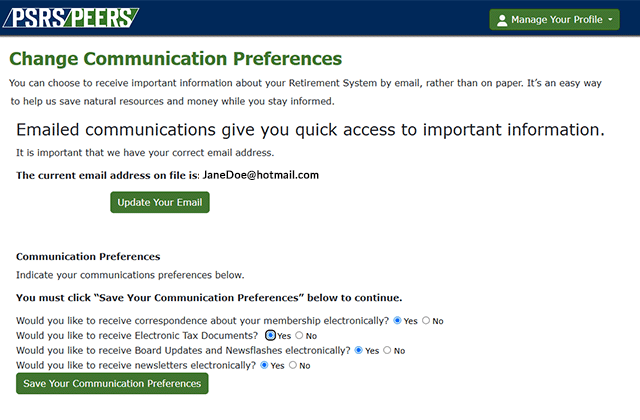
Tax time is easier when everything you need is right at your fingertips. That’s why PSRS/PEERS provides electronic delivery for your IRS Form 1099-R each January.
Now, you can choose to receive your tax form exclusively online. Please take a moment now to switch to electronic delivery for your 1099-R. It’s the fastest, most convenient way to receive your tax form each January. Going electronic gives you:
- Fast access: You’ll receive an email as soon as your 1099-R becomes available in Web Member Services (WMS) — no waiting for mail.
- All your forms in one place: View, download, and print up to five years of tax forms anytime in WMS.
- Secure and reliable storage: Your documents stay protected behind your secure WMS login.
- Less paper, less clutter: No mailed copy unless you request one.
- Supports modernization: Electronic delivery helps us focus resources where they matter most.
Make the switch in just a few steps:
- Log in to Web Member Services at https://wms.psrs-peers.org.
- You will be prompted to Change Communication Preferences.
- On the pop-up, select “Yes” for Electronic Tax Documents.
- Save your changes — that’s it.
Each year, we'll email you as soon as your 1099-R is ready to view online.
Haven’t registered for Web Member Services?
If you do not have a Web Member Services account, your first step is to Register Now on PSRS/PEERS Web Member Services. Once logged in, you will be able to manage your communication preferences, including saying “Yes” to electronic tax documents.